
SAP CDS Views in S/4HANA: The Complete Architectural & Implementation Blueprint
In legacy SAP ERP Central Component (ECC 6.0), enterprise reporting followed the traditional "data-to-code" paradigm. Large volumes of transactional records were fetched from database tables (VBAK, VBAP, BKPF, BSEG) into the ABAP application server memory using open SQL, loops, and internal tables. As transactional data scaled into tens of millions of rows, execution times degraded, leading to batch jobs, locked tables, and frustrated business users.
With the advent of SAP HANA and SAP S/4HANA, this architectural bottleneck was overturned. Modern enterprise applications adhere to the "Code-to-Data" (Pushdown) paradigm—delegating heavy calculations, aggregations, data joins, and filtering down to the in-memory SAP HANA database engine.
At the epicenter of this modern paradigm lies Core Data Services (CDS).
In this comprehensive technical guide, we unpack the architecture of ABAP CDS views, the Virtual Data Model (VDM) hierarchy, modern CDS View Entities (define view entity), essential annotations, and hands-on DDL implementations for real-world enterprise analytics.
The Paradigm Shift: Classic ABAP vs. Core Data Services
To understand why CDS views are foundational to SAP S/4HANA and Clean Core extensibility, compare the evolutionary progression of SAP data modeling:
[Traditional ECC Architecture]
Database Server (RDBMS) ──(Millions of Raw Rows)──> ABAP Application Server ──(Nested Loops / Calculations)──> End User

[Modern S/4HANA CDS Architecture]
SAP HANA In-Memory DB (Calculations / Aggregations / Joins) ──(Aggregated Result Set)──> ABAP Application Server ──(Fiori / OData / SAC)──> End User
| Dimension | Classic ABAP Dictionary Views (SE11) | Core Data Services (CDS) Views |
|---|---|---|
| Execution Layer | Database server with limited pushdown | Full pushdown to SAP HANA execution engine |
| Calculations & Aggregations | Performed on the ABAP Application Server | Performed natively in-memory on HANA DB |
| Semantic Enrichments | Basic field text descriptions only | Rich metadata annotations (@UI, @Semantics, @Analytics) |
| Associations | Rigid inner and left outer joins evaluated immediately | Lazy joins evaluated only on-demand when queried |
| Consumption Channels | Limited to ABAP programs and ALV reports | Direct OData publication, Fiori Elements, SAP Analytics Cloud |
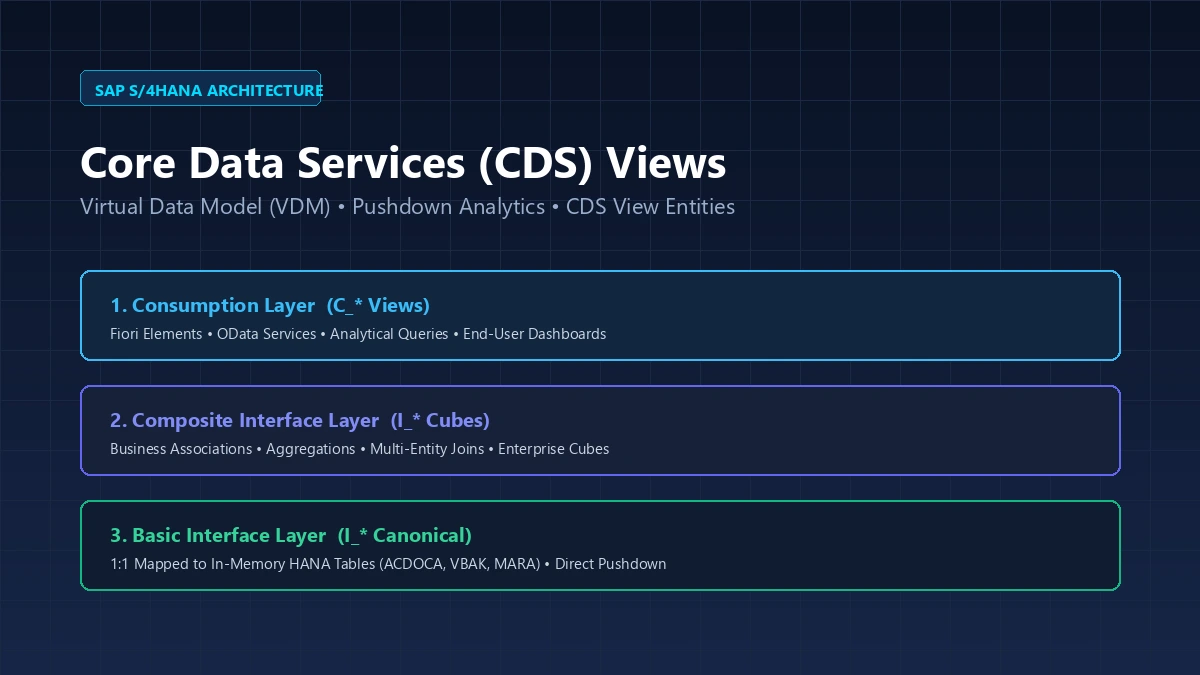
The SAP Virtual Data Model (VDM) Hierarchy
SAP enforces an architectural taxonomy known as the Virtual Data Model (VDM) to ensure reusability, governance, and upgrade safety across standard and custom developments.
The VDM architecture is structured into three standardized layers:
                               ┌────────────────────────────────┐
                               │       Consumption Views        │
                               │  (C_*, Fiori Elements, OData)  │
                               └───────────────▲────────────────┘
                                               │
                               ┌───────────────┴────────────────┐
                               │   Composite Interface Views    │
                               │   (I_*, Joins, Cubes, Business)│
                               └───────────────▲────────────────┘
                                               │
                               ┌───────────────┴────────────────┐
                               │     Basic Interface Views      │
                               │   (I_*, 1:1 Underlying Tables) │
                               └───────────────▲────────────────┘
                                               │
                               ┌───────────────┴────────────────┐
                               │    Database Tables (HANA)      │
                               │   (ACDOCA, VBAK, MARA, VBAP)   │
                               └────────────────────────────────┘
1. Basic Interface Views (#BASIC)
- Naming Convention:
I_<EntityName>(e.g.,I_Product,I_Customer,I_JournalEntryItem). - Purpose: Serve as the direct, 1-to-1 canonical view over underlying database tables (
MARA,KNA1,ACDOCA). - Characteristics: Zero business logic or complex joins. They clean up field naming, map domain values, and expose standard business associations.
2. Composite Interface Views (#COMPOSITE)
- Naming Convention:
I_<BusinessEntity>CubeorI_<EntityName>. - Purpose: Combine multiple Basic views using joins, associations, and enterprise business calculations.
- Characteristics: Vendor-independent reusable models. They do not contain client-specific UI annotations, making them reusable across multiple business departments.
3. Consumption Views (#CONSUMPTION)
- Naming Convention:
C_<EntityName>(e.g.,C_SalesOrderAnalyticsQuery). - Purpose: Tailored directly for specific front-end consumption targets, including SAP Fiori Elements apps, OData APIs, Analysis for Office, or SAP Analytics Cloud (SAC).
- Characteristics: Contain
@UIannotations for smart filters, smart tables, and chart dimensions.
Modern CDS: View Entities vs. Classic Database Views
If you have worked with CDS in earlier NetWeaver 7.40 or 7.50 releases, you may remember using the define view statement with @AbapCatalog.sqlViewName.
Since ABAP 7.55 (SAP S/4HANA 2020), SAP introduced CDS View Entities via the define view entity statement:
/* DEPRECATED: Classic CDS View (Pre-7.55) */
@AbapCatalog.sqlViewName: 'ZSQL_SO_ITEM'
define view ZI_SalesOrderItem as select from vbap { ... }

/* MODERN BEST PRACTICE: CDS View Entity (7.55+) */
define view entity ZI_SalesOrderItemEntity as select from vbap { ... }
Why Did SAP Deprecate Classic CDS SQL Views?
- Zero Redundant SQL View in SE11: Classic CDS generated an auxiliary SQL view in the ABAP Dictionary. CDS View Entities exist purely in the ABAP CDS repository, reducing transport overhead.
- Strict Type Safety: View entities validate expression types, nullability, and union compatibility during compile time.
- Faster Activation: Up to 40% faster activation times during massive enterprise deployments and transports.
- Enhanced Features: Supports cycle detection in associations, improved buffer management, and native calculation functions.
Practical Hands-On Implementation: Building a Sales Analytics Cube
Let's walk through an enterprise implementation in ABAP Development Tools (ADT) in Eclipse. We will construct a Composite analytical cube aggregating sales order headers and items with currency conversion and business partner associations.
Step 1: Defining the Composite View Entity DDL
@AccessControl.authorizationCheck: #CHECK
@EndUserText.label: 'Sales Order Analytics Composite Cube'
@VDM.viewType: #COMPOSITE
@Analytics.dataCategory: #CUBE

define view entity ZI_SalesOrderAnalyticsCube
  as select from I_SalesOrderItem as Item

  /* Modern Association (Lazy Join) */
  association [1..1] to I_SalesOrder as _Header
    on $projection.SalesOrder = _Header.SalesOrder
  association [0..1] to I_Customer   as _SoldToParty
    on $projection.SoldToParty = _SoldToParty.Customer
{
  key Item.SalesOrder,
  key Item.SalesOrderItem,

      Item.Material,
      Item.Plant,
      Item.StorageLocation,
      _Header.SalesOrderType,
      _Header.SoldToParty,
      _Header.CreationDate,

      /* Semantic Quantities and Units */
      @Semantics.quantity.unitOfMeasure: 'OrderQuantityUnit'
      Item.OrderQuantity,
      Item.OrderQuantityUnit,

      /* Semantic Currency Amounts with Conversion Handling */
      @Semantics.amount.currencyCode: 'TransactionCurrency'
      Item.NetAmount,
      Item.TransactionCurrency,

      /* Association Exposure */
      _Header,
      _SoldToParty
}
Step 2: Defining the Consumption View with Analytical & UI Annotations
Now, we wrap the composite cube into a consumable analytical query that can be bound directly to a Fiori Elements Analytical List Page:
@AccessControl.authorizationCheck: #CHECK
@EndUserText.label: 'Sales Order Analytical Query'
@VDM.viewType: #CONSUMPTION
@Analytics.query: true
@OData.publish: true

define view entity ZC_SalesOrderAnalyticsQuery
  as select from ZI_SalesOrderAnalyticsCube
{
  @AnalyticsDetails.query.axis: #ROWS
  @UI.lineItem: [{ position: 10, label: 'Sales Document' }]
  key SalesOrder,

  @AnalyticsDetails.query.axis: #ROWS
  @UI.lineItem: [{ position: 20, label: 'Item Number' }]
  key SalesOrderItem,

  @AnalyticsDetails.query.axis: #ROWS
  @UI.selectionField: [{ position: 10 }]
  @UI.lineItem: [{ position: 30, label: 'Customer' }]
  SoldToParty,

  @UI.selectionField: [{ position: 20 }]
  @UI.lineItem: [{ position: 40, label: 'Material Code' }]
  Material,

  @AnalyticsDetails.query.axis: #COLUMNS
  @DefaultAggregation: #SUM
  @UI.lineItem: [{ position: 50, label: 'Order Quantity' }]
  OrderQuantity,

  @AnalyticsDetails.query.axis: #COLUMNS
  @DefaultAggregation: #SUM
  @UI.lineItem: [{ position: 60, label: 'Total Revenue' }]
  NetAmount,

  TransactionCurrency
}
Critical CDS Annotations Every Consultant Must Know
Annotations provide metadata instructions to the ABAP runtime, the SAP HANA engine, and the consumer UI. The most critical categories include:
1. Security & Governance (@AccessControl)
@AccessControl.authorizationCheck: #CHECKenforces CDS Data Control Language (DCL) authorization roles. If a user does not have plant authorization in PFCG, rows are filtered out at the database level.#NOT_ALLOWEDor#NOT_REQUIREDmust only be used on non-sensitive master data views.
2. Analytical Engine (@Analytics)
@Analytics.dataCategory: #CUBEinforms the analytical engine that the view provides aggregated metrics across dimensions.@Analytics.query: trueinstructs the system that the view is an executable multi-dimensional query.
3. Fiori Elements & Visual Presentation (@UI)
@UI.lineItem: Controls column visibility, sequence, and labels in SAP Fiori tables.@UI.selectionField: Renders input search fields in the Fiori smart filter bar.@UI.facet: Organizes object page layouts into header facets, sections, and field groups.
Associations vs. Joins: The Hidden Performance Multiplier
One of the most misunderstood capabilities in CDS is the difference between a traditional SQL JOIN and a CDS ASSOCIATION.
- SQL Joins: Always execute against the database, regardless of whether the user requests fields from the joined table. In a query retrieving 10 columns across 5 tables, all 5 tables are joined in memory.
- CDS Associations (On-Demand / Lazy Joins): An association defines an architectural relationship between two entities. However, the database join is only executed if a field from the associated entity is actively requested in the projection list or query consumer.
/* If the user only selects SalesOrder and NetAmount,
   _SoldToParty is NEVER joined in the underlying SQL query! */
association [0..1] to I_Customer as _SoldToParty
  on $projection.SoldToParty = _SoldToParty.Customer
This dynamic pushdown optimization prevents unnecessary memory allocation on large enterprise databases like SAP HANA.
4 Performance Traps to Avoid in Production
- Calculations in WHERE Clauses: Avoid using string operations or mathematical calculations inside
WHEREconditions (e.g.,WHERE substring(Material, 1, 3) = 'MAT'). This prevents SAP HANA from utilizing database column indices. - Nested Views Deeper than 5 Levels: While VDM encourages layering, nesting more than 5 layers of composite views causes the SQL optimizer to generate massive execution plans, increasing compilation latency.
- Ignoring Client Handling: S/4HANA automatically handles client isolation (
MANDT). Never hardcodemandt = '100'in custom CDS logic. - Bypassing DCL Security: Exposing consumption views without
@AccessControl.authorizationCheck: #CHECKbypasses company code and authorization object checks, risking critical data leaks.
Frequently Asked Questions (FAQ)
What is the difference between a CDS View and a classic database view in SE11?
A classic SE11 view executes basic SQL on the database but performs aggregations on the application server. A CDS view pushes down data transformations, aggregations, associations, and semantic annotations directly to the in-memory SAP HANA database engine.
Why did SAP introduce CDS View Entities (define view entity)?
CDS View Entities replaced classic CDS DDIC views starting in ABAP 7.55 to eliminate the generation of redundant SQL views in SE11, enforce stricter type safety at compile time, and accelerate transport activation.
What is the difference between a join and an association in CDS?
A join always joins tables in database memory regardless of fields selected. An association is a lazy, on-demand join that only executes if the consumer actively requests fields from the associated target entity.
What are the three layers of the SAP Virtual Data Model (VDM)?
The VDM consists of Basic Interface Views (1:1 with underlying database tables), Composite Interface Views (combining entities with business logic and cubes), and Consumption Views (exposing data to Fiori, OData, or analytics).
Conclusion & Architectural Next Steps
Core Data Services views represent the foundational data backbone of SAP S/4HANA, the ABAP RESTful Application Programming Model (RAP), and SAP Clean Core architectures. By shifting data modeling logic directly into the HANA engine and utilizing structured Virtual Data Models, enterprises achieve sub-second analytics across massive transactional datasets.
To advance your technical skills across modern SAP architectures, explore our in-depth learning tracks:
- SAP HANA Modeling & Architecture Masterclass
- SAP Clean Core Strategy in S/4HANA: Complete Guide
- SAP FICO Career Roadmap & Financial Data Architecture
- SAP Materials Management (MM) Configuration Track
Ready to Accelerate Your Career with SAP Technical?
Stop struggling with fragmented tutorials. Get trained personally by Akshay Kumar (6+ years experience, 500+ placed professionals) with real-time S/4HANA server access, business blueprint scenarios, and 100% interview preparation.

Related Tutorials & Articles
Continue learning with more insights from ERP Academy experts.

SAP MM Release Strategy Configuration: Complete Step-by-Step Guide with Classification (PO & PR)
Master SAP MM Release Strategy configuration with classification. Step-by-step tutorial covering Characteristics (CT04), Class (CL02), SPRO Release Groups, Release Codes, Prerequisites, PO vs PR approval matrices, and real project troubleshooting.
Read Guide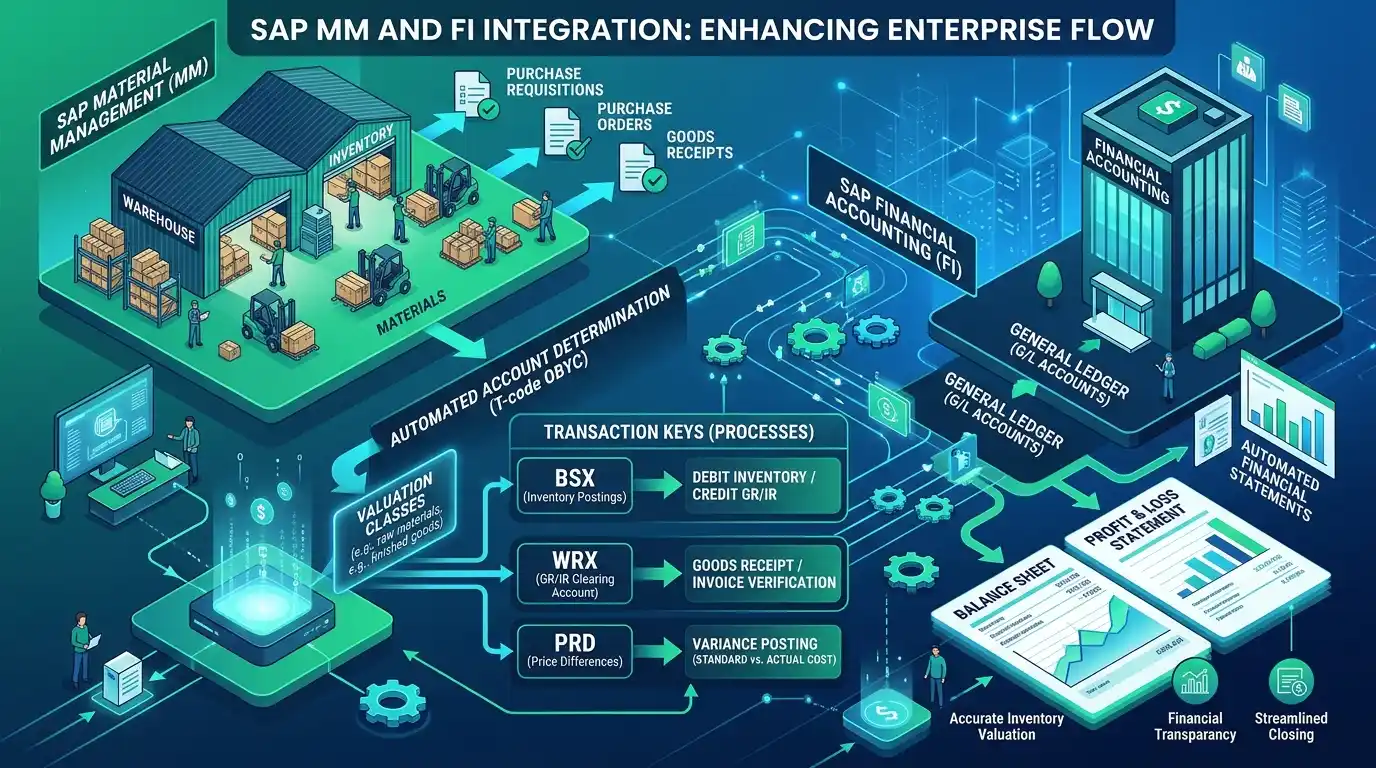
SAP MM-FI Integration & OBYC Configuration: Step-by-Step Guide with Real-Time Errors & Fixes
Master automatic account determination in SAP MM-FI integration. Complete walkthrough of Valuation Class, Account Modifiers, Transaction Keys (BSX, WRX, PRD, GBB), OBYC configuration, and how to fix common MIGO and MIRO posting errors.
Read Guide
Top 35 SAP MM & S/4HANA Sourcing Interview Questions & Answers (Scenario-Based for 2025/2026)
Preparing for an SAP MM or S/4HANA Sourcing consultant interview? Master these 35 real-time scenario questions asked by top MNCs—covering Business Partner CVI, OBYC account determination, PO release strategies, Subcontracting, and STO.
Read Guide